  download_this(
    output_name = "gerals",
    output_extension = ".xlsx", # Excel file type
    button_label = "Download Excel",
    button_type = "success", # change button type
  )
dplyr package
select
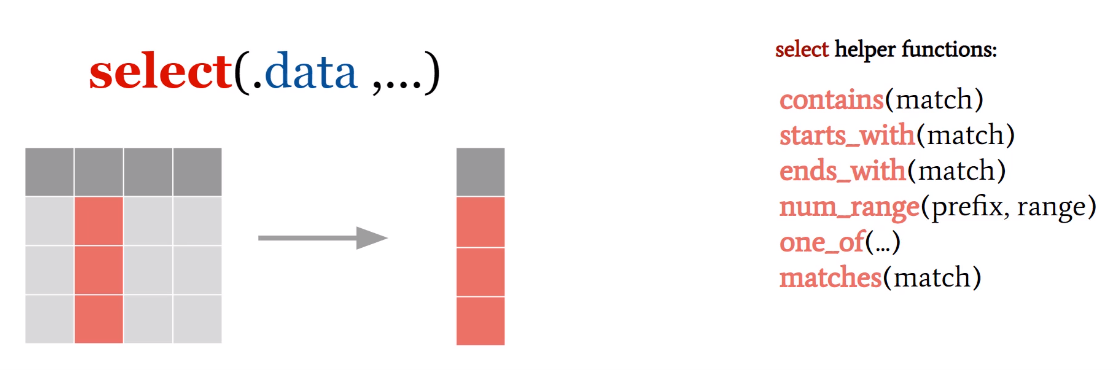
It aims to extract variables or columns as a new vector or table.
Example
contains argument: selects variables that contain …
select(mpg, starts_with(match = "m"))# A tibble: 234 × 2
manufacturer model
<chr> <chr>
1 audi a4
2 audi a4
3 audi a4
4 audi a4
5 audi a4
6 audi a4
7 audi a4
8 audi a4 quattro
9 audi a4 quattro
10 audi a4 quattro
# ℹ 224 more rowsends_whith argument: selects variables that end with …
select(mpg, ends_with(match = "y"))# A tibble: 234 × 2
cty hwy
<int> <int>
1 18 29
2 21 29
3 20 31
4 21 30
5 16 26
6 18 26
7 18 27
8 18 26
9 16 25
10 20 28
# ℹ 224 more rowsnum_range argument: the use of this argument is valid when the data set contains variables with the same initials and numbered in sequence, as is the case with variables that begin with “wk” in the “billboard” data set.
# A tibble: 317 × 6
    wk10  wk11  wk12  wk13  wk14  wk15
   <dbl> <dbl> <dbl> <dbl> <dbl> <dbl>
 1    NA    NA    NA    NA    NA    NA
 2    NA    NA    NA    NA    NA    NA
 3    51    51    51    47    44    38
 4    61    61    59    61    66    72
 5    57    64    70    75    76    78
 6     6     7    22    29    36    47
 7    NA    NA    NA    NA    NA    NA
 8    36    37    37    38    49    61
 9    10     9     8     6     1     2
10    59    66    68    61    67    59
# ℹ 307 more rows
one_off argument: selects specific variables.
# A tibble: 234 × 3
   model       year   cyl
   <chr>      <int> <int>
 1 a4          1999     4
 2 a4          1999     4
 3 a4          2008     4
 4 a4          2008     4
 5 a4          1999     6
 6 a4          1999     6
 7 a4          2008     6
 8 a4 quattro  1999     4
 9 a4 quattro  1999     4
10 a4 quattro  2008     4
# ℹ 224 more rows
matches argument: selects columns using a regular expression.
# A tibble: 317 × 76
     wk1   wk2   wk3   wk4   wk5   wk6   wk7   wk8   wk9  wk10  wk11  wk12  wk13
   <dbl> <dbl> <dbl> <dbl> <dbl> <dbl> <dbl> <dbl> <dbl> <dbl> <dbl> <dbl> <dbl>
 1    87    82    72    77    87    94    99    NA    NA    NA    NA    NA    NA
 2    91    87    92    NA    NA    NA    NA    NA    NA    NA    NA    NA    NA
 3    81    70    68    67    66    57    54    53    51    51    51    51    47
 4    76    76    72    69    67    65    55    59    62    61    61    59    61
 5    57    34    25    17    17    31    36    49    53    57    64    70    75
 6    51    39    34    26    26    19     2     2     3     6     7    22    29
 7    97    97    96    95   100    NA    NA    NA    NA    NA    NA    NA    NA
 8    84    62    51    41    38    35    35    38    38    36    37    37    38
 9    59    53    38    28    21    18    16    14    12    10     9     8     6
10    76    76    74    69    68    67    61    58    57    59    66    68    61
# ℹ 307 more rows
# ℹ 63 more variables: wk14 <dbl>, wk15 <dbl>, wk16 <dbl>, wk17 <dbl>,
#   wk18 <dbl>, wk19 <dbl>, wk20 <dbl>, wk21 <dbl>, wk22 <dbl>, wk23 <dbl>,
#   wk24 <dbl>, wk25 <dbl>, wk26 <dbl>, wk27 <dbl>, wk28 <dbl>, wk29 <dbl>,
#   wk30 <dbl>, wk31 <dbl>, wk32 <dbl>, wk33 <dbl>, wk34 <dbl>, wk35 <dbl>,
#   wk36 <dbl>, wk37 <dbl>, wk38 <dbl>, wk39 <dbl>, wk40 <dbl>, wk41 <dbl>,
#   wk42 <dbl>, wk43 <dbl>, wk44 <dbl>, wk45 <dbl>, wk46 <dbl>, wk47 <dbl>, …
rename
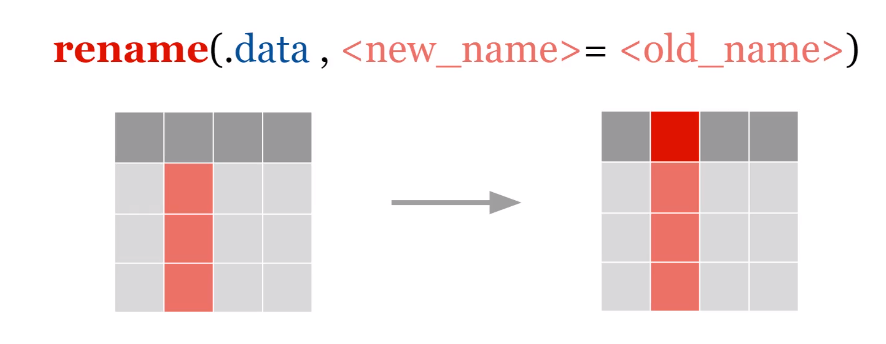
Its aims to rename variables or columns.
Example
Renaming the manufacturer and model variables from the mpg dataset.
rename(mpg, mnfc = manufacturer, mod = model)# A tibble: 234 × 11
mnfc mod displ year cyl trans drv cty hwy fl class
<chr> <chr> <dbl> <int> <int> <chr> <chr> <int> <int> <chr> <chr>
1 audi a4 1.8 1999 4 auto(l5) f 18 29 p compact
2 audi a4 1.8 1999 4 manual(m5) f 21 29 p compact
3 audi a4 2 2008 4 manual(m6) f 20 31 p compact
4 audi a4 2 2008 4 auto(av) f 21 30 p compact
5 audi a4 2.8 1999 6 auto(l5) f 16 26 p compact
6 audi a4 2.8 1999 6 manual(m5) f 18 26 p compact
7 audi a4 3.1 2008 6 auto(av) f 18 27 p compact
8 audi a4 quattro 1.8 1999 4 manual(m5) 4 18 26 p compact
9 audi a4 quattro 1.8 1999 4 auto(l5) 4 16 25 p compact
10 audi a4 quattro 2 2008 4 manual(m6) 4 20 28 p compact
# ℹ 224 more rowsSelecting and renaming variables.
select(mpg, mnf = manufacturer, mod = model)# A tibble: 234 × 2
mnf mod
<chr> <chr>
1 audi a4
2 audi a4
3 audi a4
4 audi a4
5 audi a4
6 audi a4
7 audi a4
8 audi a4 quattro
9 audi a4 quattro
10 audi a4 quattro
# ℹ 224 more rowsSelecting and renaming variable while keeping all variables in the dataset.
select(mpg, mnf = manufacturer, mod = model, everything())# A tibble: 234 × 11
mnf mod displ year cyl trans drv cty hwy fl class
<chr> <chr> <dbl> <int> <int> <chr> <chr> <int> <int> <chr> <chr>
1 audi a4 1.8 1999 4 auto(l5) f 18 29 p compact
2 audi a4 1.8 1999 4 manual(m5) f 21 29 p compact
3 audi a4 2 2008 4 manual(m6) f 20 31 p compact
4 audi a4 2 2008 4 auto(av) f 21 30 p compact
5 audi a4 2.8 1999 6 auto(l5) f 16 26 p compact
6 audi a4 2.8 1999 6 manual(m5) f 18 26 p compact
7 audi a4 3.1 2008 6 auto(av) f 18 27 p compact
8 audi a4 quattro 1.8 1999 4 manual(m5) 4 18 26 p compact
9 audi a4 quattro 1.8 1999 4 auto(l5) 4 16 25 p compact
10 audi a4 quattro 2 2008 4 manual(m6) 4 20 28 p compact
# ℹ 224 more rowsmutate
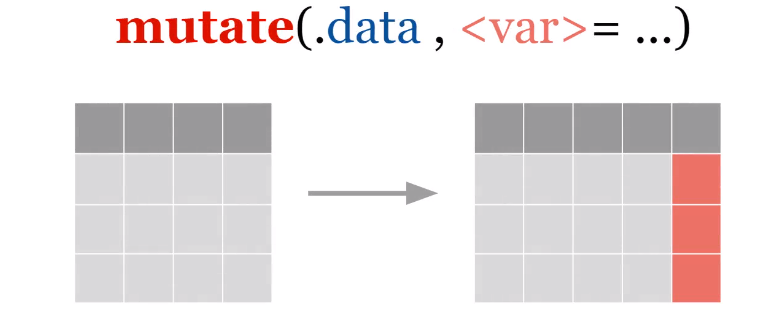
Its aims to create new variables or columns in a data table.
transmute
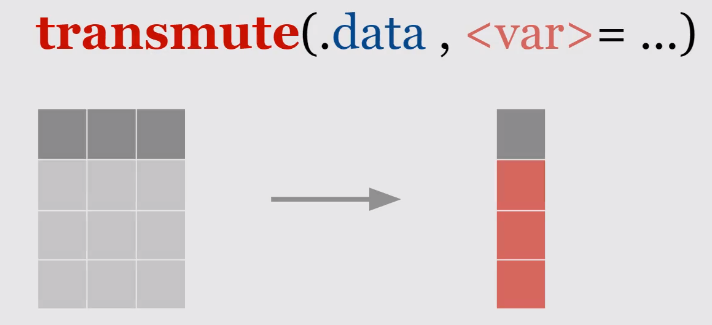
Its aims to create new variables by discarding existing variables.
Example
mutate(mpg, media = (cty+hwy)/2)# A tibble: 234 × 12
manufacturer model displ year cyl trans drv cty hwy fl class
<chr> <chr> <dbl> <int> <int> <chr> <chr> <int> <int> <chr> <chr>
1 audi a4 1.8 1999 4 auto… f 18 29 p comp…
2 audi a4 1.8 1999 4 manu… f 21 29 p comp…
3 audi a4 2 2008 4 manu… f 20 31 p comp…
4 audi a4 2 2008 4 auto… f 21 30 p comp…
5 audi a4 2.8 1999 6 auto… f 16 26 p comp…
6 audi a4 2.8 1999 6 manu… f 18 26 p comp…
7 audi a4 3.1 2008 6 auto… f 18 27 p comp…
8 audi a4 quattro 1.8 1999 4 manu… 4 18 26 p comp…
9 audi a4 quattro 1.8 1999 4 auto… 4 16 25 p comp…
10 audi a4 quattro 2 2008 4 manu… 4 20 28 p comp…
# ℹ 224 more rows
# ℹ 1 more variable: media <dbl>gt::gt(mutate(mpg, carro = paste(manufacturer, model, sep = " "),
"cyl / trans" = paste(cyl, "cylinders", " / ", trans, " transmission", sep = " "))[c(1:10),])%>%
tab_header(title = "Mutate") %>%
opt_stylize(style = 2, color = "blue")%>%
tab_source_note(attach_excel)gt::gt(transmute(mpg, carro = paste(manufacturer, model, sep = " "),
"cyl / trans" = paste(cyl, "cylinders", " / ", trans, " transmission", sep = " "))[c(1:10),])%>%
tab_header(title = "Transmute") %>%
opt_stylize(style = 2, color = "blue")%>%
tab_source_note(attach_excel)filter
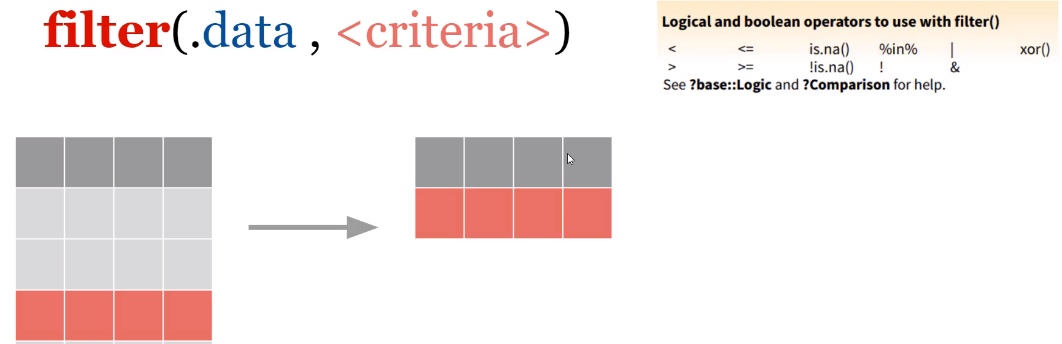
Aims to extract or obtain subsets of observations (rows) from the data table according to a logical condition.
slice
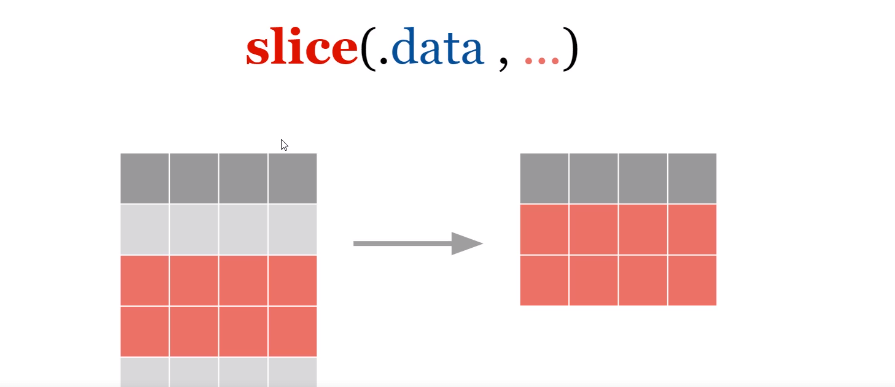
Extracts or selects lines by line position.
Example
gt::gt(filter(mpg, manufacturer == "audi")[c(1:10),])%>%
  tab_header(title = "Filter") %>%
   opt_stylize(style = 2, color = "blue")%>%
tab_source_note(attach_excel)gt::gt(filter(mpg, manufacturer == "audi" & year == 1999)[c(1:10),])%>%
tab_header(title = "Filter") %>%
opt_stylize(style = 2, color = "blue")%>%
tab_source_note(attach_excel)gt::gt(filter(mpg, manufacturer == "audi" | manufacturer == "dodge")[c(1:10),])%>%
tab_header(title = "Filter") %>%
opt_stylize(style = 2, color = "blue")%>%
tab_source_note(attach_excel)gt::gt(filter(mpg, hwy >= 30)[c(1:10),])%>%
tab_header(title = "Filter") %>%
opt_stylize(style = 2, color = "blue")%>%
tab_source_note(attach_excel)gt::gt(filter(mpg, year != 1999)[c(1:10),])%>%
tab_header(title = "Filter") %>%
opt_stylize(style = 2, color = "blue")%>%
tab_source_note(attach_excel)gt::gt(slice(mpg, 1:10)[c(1:10),])%>%
tab_header(title = "Filter") %>%
opt_stylize(style = 2, color = "blue")%>%
tab_source_note(attach_excel)gt::gt(slice(mpg, 20:30)[c(1:10),])%>%
tab_header(title = "Filter") %>%
opt_stylize(style = 2, color = "blue")%>%
tab_source_note(attach_excel)gt::gt(slice(mpg, (nrow(mpg)-9):nrow(mpg))[c(1:10),])%>%
tab_header(title = "Filter") %>%
opt_stylize(style = 2, color = "blue")%>%
tab_source_note(attach_excel)gt::gt(slice(mpg, (nrow(mpg)-9):nrow(mpg))[c(1:10),])%>%
tab_header(title = "Filter") %>%
opt_stylize(style = 2, color = "blue")%>%
tab_source_note(attach_excel)arrange
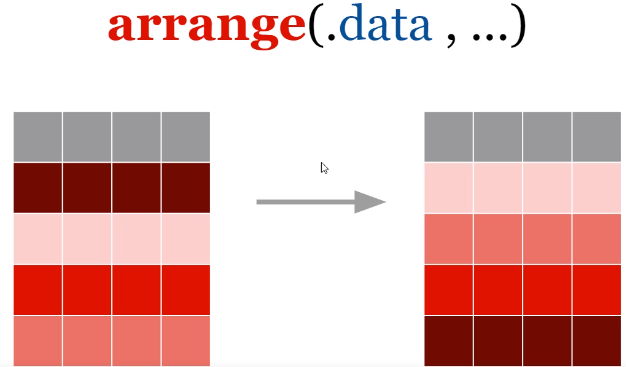
Aims to select observations (rows) by values from one or more columns.
Example
gt::gt(arrange(mpg, year)[c(1:10),])%>%
  tab_header(title = "Filter") %>%
   opt_stylize(style = 2, color = "blue")%>%
tab_source_note(attach_excel)gt::gt(arrange(mpg, desc(year))[c(1:10),])%>%
tab_header(title = "Filter") %>%
opt_stylize(style = 2, color = "blue")%>%
tab_source_note(attach_excel)gt::gt(arrange(mpg, year, cyl, displ)[c(1:10),])%>%
tab_header(title = "Filter") %>%
opt_stylize(style = 2, color = "blue")%>%
tab_source_note(attach_excel)distinct
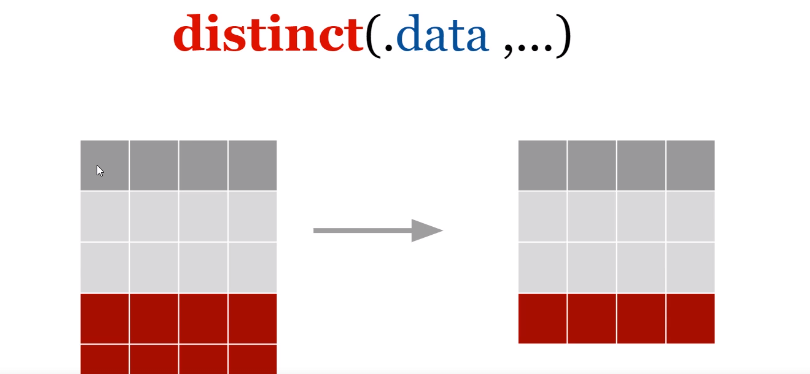
Its aims to remove observations (lines) with duplicate values.
Example
data <- select(mpg, manufacturer, model, year, cyl)
gt::gt(distinct(data)[c(1:10),])%>%
  tab_header(title = "Filter") %>%
   opt_stylize(style = 2, color = "blue")%>%
  tab_source_note(attach_excel)